Free Spelling Bee Word Generator: Create Custom Lists & Download PDFs Instantly
🎉 Generate, Download & Save! Create unlimited spelling bee word lists, download as PDF, and save to your account
Generate Free Word List Now →Preparing students for spelling bees can be challenging. You need word lists that match their skill level, focus on specific patterns, and provide enough variety to keep practice engaging. That's why we created a free spelling bee word generator that puts you in control—with instant PDF downloads and the ability to save lists for future practice.
What Is a Spelling Bee Word Generator?
A spelling bee word generator is an online tool that automatically creates customized lists of spelling words based on your specific criteria. Instead of manually searching through dictionaries or buying expensive word list books, you can generate exactly the words you need in seconds—completely free.
Our free spelling bee word generator allows you to:
- Filter by grade level (Kindergarten through 12th grade)
- Set difficulty levels (1-10 scale for precise targeting)
- Select phonics patterns (vowel teams, consonant blends, silent letters, etc.)
- Choose list length (10-25 words free, up to 100 words for premium users)
- Download as PDF with professional formatting
- Save to your account for future practice (premium feature)
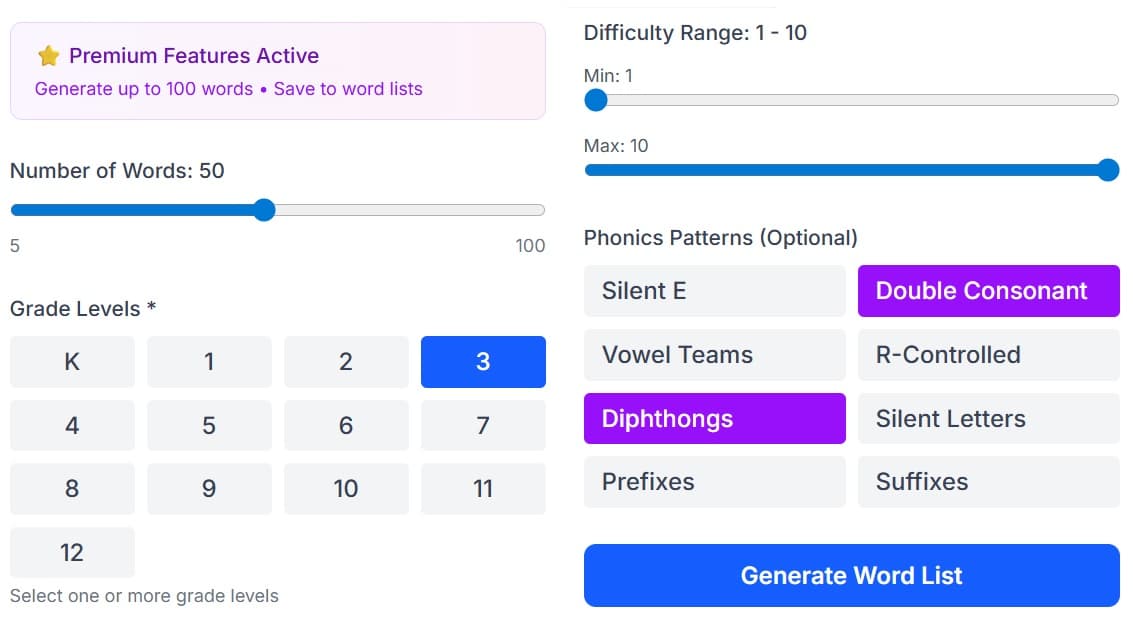
The free spelling bee word generator interface lets you customize every aspect of your word list
Why Use Our Free Spelling Bee Word Generator?
1. Save Hours of Preparation Time
Teachers and parents spend countless hours searching for appropriate spelling words. Our generator eliminates this busywork, creating comprehensive lists in under 30 seconds. Instead of browsing through spelling books or websites, you can focus on actually teaching and practicing with students.
2. Perfectly Match Student Skill Levels
Every student learns at their own pace. A 4th grader struggling with spelling needs different words than an advanced 4th grader. Our generator lets you create separate lists for each skill level, ensuring every student is appropriately challenged without being overwhelmed or bored.
3. Professional PDF Downloads - Print Ready
Every generated list can be downloaded as a beautifully formatted PDF with:
- Two-column word card layout for efficient paper usage
- Complete word information including pronunciation, part of speech, definition, and example sentences
- Quick reference answer key in a 3-column format
- Professional formatting perfect for classroom handouts
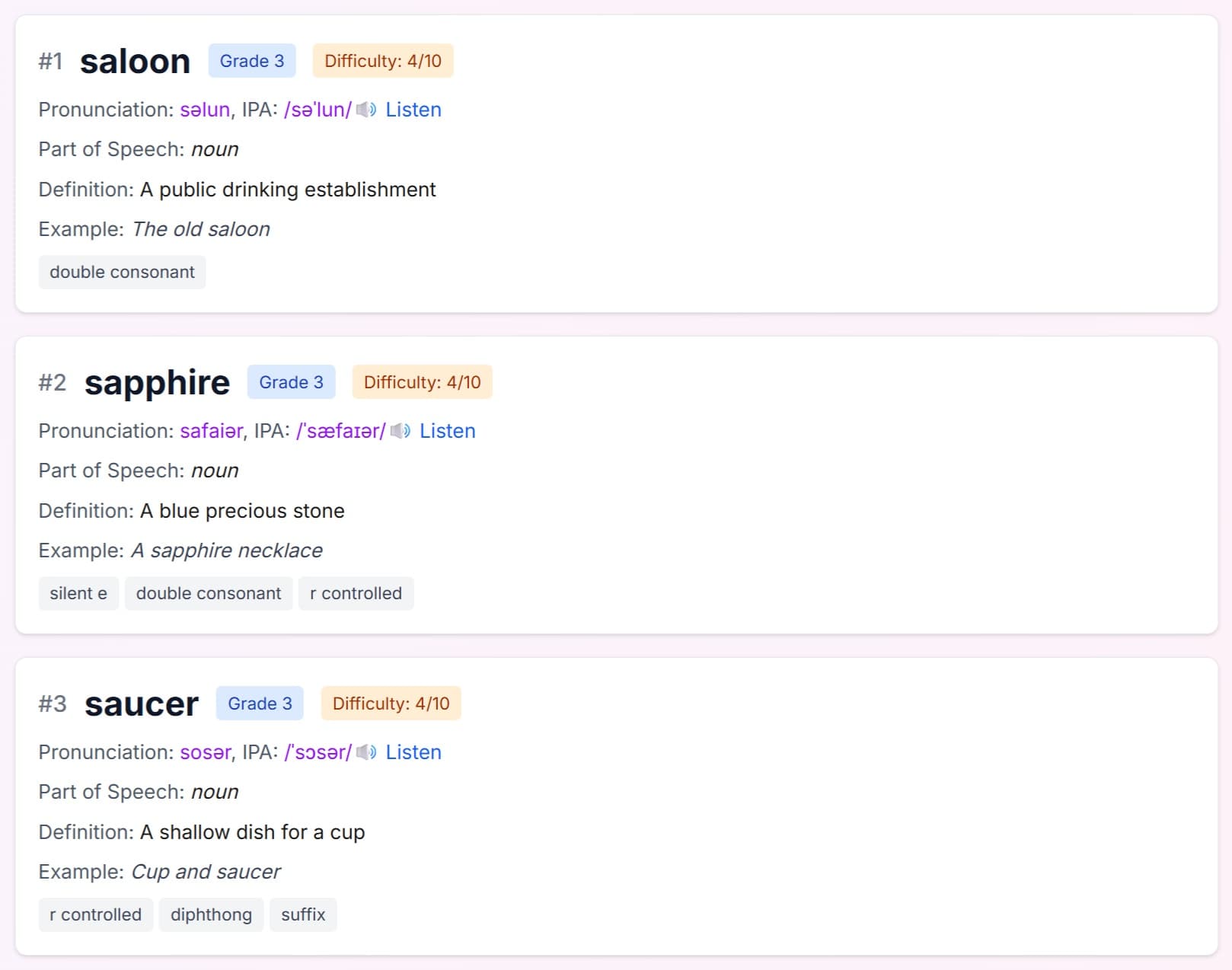
Your generated list displays all word details with options to save, print, or download as PDF
4. Save Lists to Your Account (Premium Feature)
Premium users can save their generated lists directly to "My Word Lists" for future use. This means you can:
- Build a library of customized word lists
- Assign saved lists to your children for practice
- Access your lists anytime from any device
- Track which lists have been practiced
- Reuse successful lists with different students
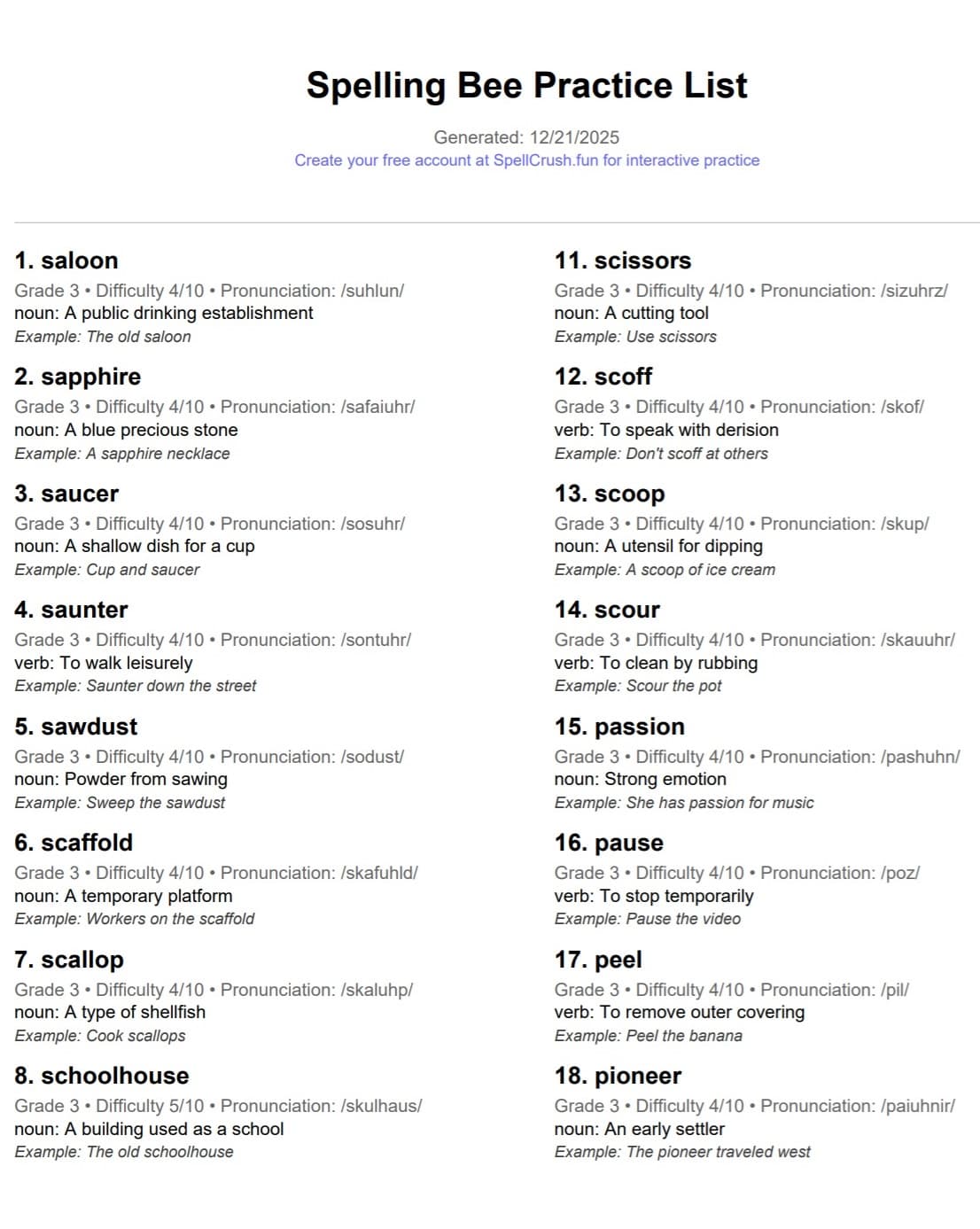
Downloaded PDFs feature a professional 2-column layout with complete word information and an answer key
5. Focus on Specific Learning Goals
Want to work on silent E words this week? Or maybe focus on double consonants? The generator's phonics pattern filters let you target specific spelling concepts, making your instruction more focused and effective.
6. Keep Practice Fresh and Engaging
Students get bored practicing the same words repeatedly. Generate unlimited new lists to keep practice sessions interesting while still targeting the same skill level and patterns.
How to Use Our Free Spelling Bee Word Generator
Using our spelling bee word generator is simple. Here's a step-by-step walkthrough:
Step 1: Choose Your Grade Level
Start by selecting the appropriate grade level for your student or class. Our database includes words suitable for:
- Kindergarten-2nd Grade: Simple CVC words, sight words, basic phonics
- 3rd-5th Grade: Multi-syllable words, common prefixes/suffixes, irregular spellings
- 6th-8th Grade: Complex words, Latin/Greek roots, advanced patterns
- 9th-12th Grade: College-level vocabulary, competition-level words
Step 2: Select Difficulty Range
Use our intuitive sliders to set minimum and maximum difficulty levels (1-10 scale):
- Levels 1-3: Core vocabulary for that grade level
- Levels 4-7: More challenging words with varied patterns
- Levels 8-10: Competition-level words that will stretch students
Step 3: Filter by Phonics Patterns (Optional)
If you want to focus on specific spelling concepts, use the phonics pattern filters:
- Silent E (magic E patterns)
- Double consonants
- Vowel teams (ai, ea, oa, etc.)
- R-controlled vowels (ar, er, ir, or, ur)
- Diphthongs (oi, oy, ou, ow)
- Silent letters
- Prefixes and suffixes
- And many more!
Step 4: Choose List Length
Decide how many words you need:
- 10 words: Perfect for daily practice or quick quizzes
- 15-25 words (Free users): Great for weekly spelling tests
- 50-100 words (Premium users): Ideal for comprehensive study lists or competition preparation
Step 5: Generate Your List
Click "Generate Word List" and watch as your customized list appears instantly with:
- Each word's pronunciation (phonetic transcription)
- Part of speech (noun, verb, adjective, etc.)
- Clear, concise definitions
- Example sentences showing proper usage
- Grade level and difficulty rating
- Etymology information
- Identified phonics patterns
Step 6: Download, Print, or Save
Once your list is generated, you have several options:
- 📄 Download PDF: Get a professionally formatted, print-ready document with 2-column layout
- 🖨️ Print List: Print directly from your browser for immediate use
- 💾 Save to My Word Lists (Premium): Store the list in your account to assign to children and track progress
- 🔄 Regenerate: Don't like the selection? Generate a new list with the same criteria
Ready to Generate Your First Free Word List?
Create unlimited spelling bee word lists for free. Download as PDF instantly. No credit card required!
Generate Free Word List Now →Understanding the PDF Format
Our PDF generator creates professional, print-ready documents optimized for classroom and home use:
Word Cards Section (2-Column Layout)
Each word is presented as a detailed "card" containing:
- Word number and spelling in bold for easy reference
- Grade level, difficulty rating, and pronunciation on one compact line
- Part of speech and definition for context and understanding
- Example sentence showing the word in practical use
The 2-column format maximizes page space, fitting approximately twice as many words per page while maintaining readability.
Answer Key (3-Column Layout)
The final pages include a condensed answer key in 3 columns, perfect for:
- Quick reference during oral practice
- Self-checking by students
- Parent helpers who need a simple word list
- Spelling bee moderators
Premium Features: Save & Organize Your Lists
While anyone can generate and download word lists for free, premium SpellCrush users get additional powerful features:
Generate Up to 100 Words
Premium users can create extra-long lists with up to 100 words—perfect for:
- Competition preparation: Build comprehensive study lists for spelling bee contestants
- Semester-long programs: Create master lists for extended practice periods
- Advanced learners: Challenge gifted students with extensive vocabulary
Save to My Word Lists
The "Save to My Word Lists" feature transforms the generator from a one-time tool to a complete practice management system:
- Name and organize lists: Give each list a descriptive name like "Week 3 Silent E Words" or "Competition Round 1"
- Build your library: Create a collection of lists for different topics, difficulty levels, and purposes
- Assign to children: Link saved lists to specific children in your account
- Access anywhere: Your saved lists sync across all devices
- Track progress: See which lists have been practiced and monitor improvement
Seamless Workflow
Here's how premium users typically work:
- Generate a customized word list using the free generator tool
- Review the words and click "Save to My Word Lists"
- Name the list (e.g., "4th Grade Vowel Teams")
- Success! The list appears in your Word Lists library
- Assign the list to one or more children
- Children practice using SpellCrush's interactive practice mode
- Track progress and mastery over time
💡 Pro Tip: Generate Multiple Variations
Create several lists with the same criteria to build a rotation of practice materials. For example, generate three different "Grade 5, Difficulty 6-8, Vowel Teams" lists and alternate between them each week to keep practice fresh!
Creative Ways to Use Your Generated Word Lists
For Teachers:
- Differentiated Instruction: Generate three separate lists (difficulty 1-4, 4-7, 7-10) for mixed-ability classrooms
- Weekly Tests: Generate a fresh 25-word list every Monday, download as PDF, and photocopy for Friday's spelling test
- Spelling Bee Practice: Build competition-level lists (difficulty 8-10) to prepare students for school or regional bees
- Homework Assignments: Generate and download customized PDFs that match each student's level
- Word Study Centers: Create themed word lists, print multiple copies, and use for literacy center activities
- Parent Communication: Send generated PDFs home so parents know exactly which words to practice
For Parents:
- Summer Practice: Keep skills sharp during break with age-appropriate word lists (generate weekly and download PDFs)
- Homeschool Curriculum: Build a year-long spelling program with saved weekly word lists
- Competition Prep: Generate advanced lists, save to your account, and track your child's progress through competition preparation
- Remedial Practice: Focus on specific problem areas with phonics-filtered lists (e.g., only words with silent letters)
- Car Rides & Waiting Rooms: Download PDFs to your phone for practice anywhere
- Advanced Enrichment: Challenge gifted students with above-grade-level words (premium: up to 100 words per list!)
For Students:
- Self-Directed Practice: Generate lists at your comfort level for independent study
- Competition Training: Create progressive lists starting easy and gradually increasing difficulty
- Pattern Recognition: Focus on specific phonics patterns you're struggling with
- Test Prep: Generate practice tests to quiz yourself before the real thing
- Study Groups: Generate and share PDFs with classmates for group study sessions
Tips for Effective Spelling Bee Practice with Generated Lists
Having a great word list is just the first step. Here's how to make the most of your generated lists:
1. Practice Little and Often
Research shows that distributed practice (10-15 minutes daily) is far more effective than marathon cramming sessions. Generate a manageable 10-15 word list for daily practice rather than overwhelming students with 50 words at once.
2. Use the Complete Word Information
Don't just drill spellings—use all the information in your generated list:
- Pronunciation: Practice saying words correctly before spelling them
- Definitions: Understanding meaning aids memory and retention
- Example sentences: See how words function in context
- Part of speech: Recognize patterns (many nouns end in -tion, verbs in -ify, etc.)
- Phonics patterns: Identify common spelling rules within your list
3. Leverage the PDF Format
The downloadable PDF is designed for versatile use:
- Practice mode: Cover the spellings, read definitions, and spell words aloud
- Study guide: Review all information before testing
- Answer key: Use the quick reference page for rapid drilling
- Annotation: Print and write notes, mark difficult words, or highlight patterns
4. Track Progress and Adjust
Keep a record of which words students master and which need more work. Use the generator to create follow-up lists that:
- Include previously missed words alongside new challenges
- Focus on patterns causing difficulty (filter by specific phonics patterns)
- Gradually increase difficulty as mastery improves (adjust the difficulty slider)
5. Make It Fun
Turn your generated lists into games:
- Spelling relay races with teams
- Word scavenger hunts around the house
- Spelling tic-tac-toe
- Hangman with words from your list
- Class spelling bee tournaments
- Reward milestones (every 10 words mastered = special prize)
Frequently Asked Questions About Our Free Generator
Is the spelling bee word generator really free?
Yes! You can generate unlimited word lists completely free. We offer 2 free preview generations for non-registered users, then unlimited generations (up to 25 words) when you create a free account. Premium users can generate lists with up to 100 words and save them to their account. No credit card required for the free version.
Can I download the word lists as PDF for free?
Absolutely! Every generated list can be downloaded as a professionally formatted PDF at no cost. The PDF includes the complete word information in an easy-to-read 2-column layout plus a condensed answer key—perfect for printing and classroom use.
What's the difference between free and premium?
Free users can generate unlimited lists of up to 25 words and download PDFs. Premium users ($4.99/month) can generate lists with up to 100 words, save lists to their account, assign lists to children, and access interactive practice features with progress tracking.
Where do the words come from?
Our database includes thousands of words from official spelling bee lists, educational standards, and common usage dictionaries. All words are carefully curated and categorized by grade level, difficulty, and phonics patterns. Each word includes pronunciation, definition, part of speech, example sentence, and etymology.
Can I save my generated lists?
Saving lists to your account is a premium feature. Free users can download PDFs of their lists for offline storage. Premium users can click "Save to My Word Lists" to store lists in their account, name them, assign them to children, and access them from any device.
Are these words suitable for actual spelling bee competitions?
Absolutely! Our advanced difficulty levels include competition-appropriate words used in school, regional, and national spelling bees. Many teachers and parents use our generator specifically to prepare students for competitions. For best results, use difficulty levels 7-10 and generate multiple 25-50 word lists for comprehensive preparation.
How often can I generate new lists?
As often as you want! Registered users have unlimited generations. Generate a new list every day, every week, or whenever you need fresh practice material. The randomization ensures you'll get different words each time, even with the same criteria.
What if I don't like some words in my generated list?
Simply click "Generate Word List" again with the same criteria to get a completely new set of words. You can generate as many variations as you want until you find the perfect list. With thousands of words in our database, you'll always get fresh selections.
Beyond Word Lists: Complete Spelling Bee Preparation
While having great word lists is essential, comprehensive spelling bee preparation involves more than just memorizing words. Consider complementing your generated lists with:
- Interactive Practice: Use our free spelling assessment to identify your student's current level before generating lists
- Adaptive Learning: Create a SpellCrush account for AI-powered practice that adapts to each student's skill level
- Competition Simulation: Practice with our spelling bee mode that mimics real competition conditions
- Progress Tracking: Monitor improvement over time with detailed analytics and mastery indicators
- Gamification: Keep students motivated with XP points, streaks, and achievement badges
Start Generating Free Spelling Bee Word Lists Today
Join thousands of teachers and parents who use our free generator to create perfect practice lists in seconds. Download PDFs instantly, save to your account (premium), and track progress!
Generate Free Word List Now →No credit card required • Unlimited generations with free account • Download PDFs instantly
Conclusion: The Smartest Way to Create Spelling Word Lists
A good spelling bee word generator is an invaluable tool for teachers, parents, and students. By providing instant access to customized, grade-appropriate word lists—complete with pronunciations, definitions, and downloadable PDFs—it eliminates hours of preparation work and ensures practice is always targeted and effective.
Whether you're preparing a single student for competition, managing a classroom of diverse learners, or homeschooling multiple children, our free spelling bee word generator gives you the flexibility and control to create exactly what you need, exactly when you need it.
Best of all? It's completely free, with unlimited generations available to registered users. No subscriptions required for basic features, no hidden fees, just instant access to thousands of high-quality spelling words organized exactly how you need them.
Premium features like 100-word lists and the "Save to My Word Lists" functionality take the tool even further, transforming it from a simple generator into a complete practice management system that grows with your students.
Ready to revolutionize your spelling practice? Generate your first free word list now and see the difference it makes!

