Learning Mode

See the word, then spell it from memory

Learning Mode shows your child each new spelling word so they can study and build it — then the word disappears and they spell it from memory. It's how a word goes from “never seen it” to “known for good.”

No signup needed for the demo • Free plan available

Two screens for every new word

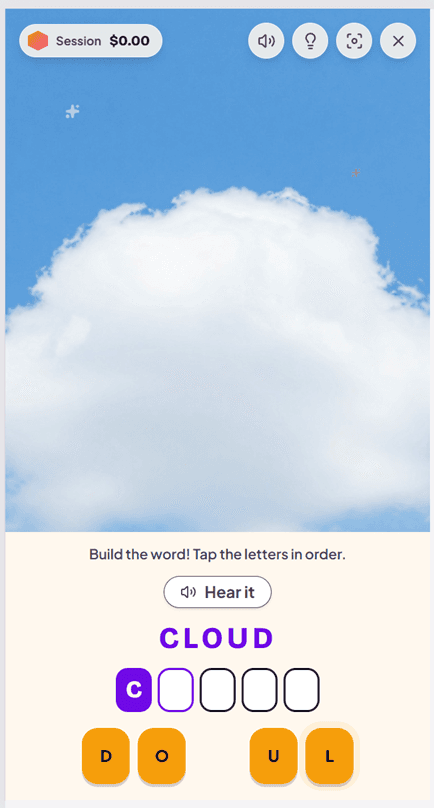
Here's the word CLOUD in Learning Mode. The first screen teaches the spelling; the second checks that it stuck.

Learning Mode screen 1: the word CLOUD is shown above letter tiles, and the child taps the letters in order to build the correct spelling.
Screen 1 · See it & build it

The word is shown

Your child sees a picture of a cloud, hears the word read aloud, and sees CLOUD spelled out. They tap the letters in the right order to build it — studying every letter instead of guessing.
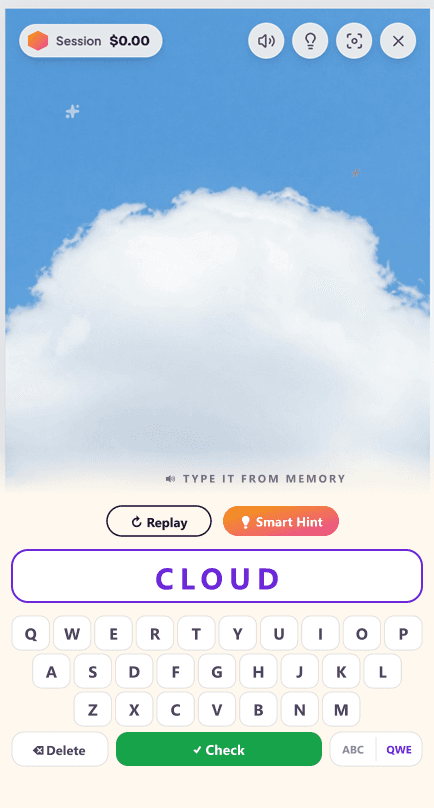
Learning Mode screen 2: the word is hidden and the child types CLOUD from memory on the on-screen keyboard, with Replay and Smart Hint buttons available.
Screen 2 · Spell it from memory

The word disappears

Now the spelling is gone. Your child hears CLOUD again and types it from memory. If they get stuck, they can replay the audio or tap Smart Hint for an AI memory trick — so a hard word is always a chance to learn.

Why “study, then recall” works

Learning Mode is built on two of the most reliable findings in learning science: you have to encode a spelling before you can recall it, and recalling it is what makes it stick.

Accurate encoding first

Showing the correct spelling — and building it letter by letter — gives the brain a clean, accurate model. No practising a wrong guess by accident.

Active recall second

Hiding the word and retrieving it from memory is the single most effective study technique for long-term retention. Copying can't compete.

Help exactly when needed

Audio replay, a definition, and an AI Smart Hint are one tap away — and the answer is revealed if needed, so confusion never hardens into a habit.

How one word plays out

  1. 1

    Hear it

    The word is read aloud in your child's English variant — American, British, Australian, or Canadian — with a matching accent.

  2. 2

    See it & build it

    The correct spelling appears. Your child taps the letters in order, studying the word as they assemble it.

  3. 3

    Spell it from memory

    The spelling disappears and your child types the word from memory on the keyboard.

  4. 4

    Get a hint if stuck

    Replay the audio, re-read the definition, or tap Smart Hint for an AI memory trick made for that exact word.

  5. 5

    Words come back until mastered

    In a full account, words your child struggles with reappear in future sessions until they're truly mastered.

Who Learning Mode helps most

Younger spellers (Pre-K to early elementary) meeting words for the first time
Kids learning this week's brand-new spelling list
Children who freeze on a blank box but thrive when shown the word first
Struggling or reluctant spellers who need a confidence-building on-ramp
Tricky, irregular words where guessing reinforces the wrong spelling
Anyone building durable long-term memory, not just passing a Friday test

Learning Mode FAQ

What is Learning Mode in SpellCrush?
Learning Mode is a two-step way to practice brand-new spelling words. First, the word is shown on screen and your child builds it letter by letter so they study the correct spelling. Then the word disappears and they spell it from memory on the keyboard. Seeing the word, then recalling it, is what moves a spelling from short-term recognition into long-term memory.
How is Learning Mode different from a normal spelling test?
A spelling test asks your child to spell a word they're expected to already know — no help is shown. Learning Mode is for learning words they don't know yet: it shows the word first so they can study it, then immediately asks them to reproduce it from memory while it's still fresh. It teaches the word and checks it in the same step.
Why show the word before asking the child to spell it?
Because you can't recall what you never encoded. Showing the correct spelling first gives your child a clear, accurate model to study. Building it letter by letter forces them to look at each letter in order instead of guessing. When the word then disappears, retrieving it from memory strengthens the memory far more than copying ever could.
Does the child get help if they get stuck spelling from memory?
Yes. On the recall screen they can replay the word audio, hear the definition again, and tap Smart Hint for an AI-generated memory trick tailored to the word. If they miss it after a few tries, the correct spelling and a mnemonic are revealed before moving on — so a tricky word is always a teaching moment, never a dead end.
What ages and grades is Learning Mode good for?
Learning Mode works for every age SpellCrush supports — Pre-K through 12th grade. It's especially helpful for younger or struggling spellers and for any brand-new or tricky word, because the study-first step removes the guesswork before the recall step builds the memory.
Can I try Learning Mode without signing up?
Yes. You can run a free five-word Learning Mode demo right in your browser — no account needed. Create a free SpellCrush account to unlock full sessions with words that adapt to your child's level, saved progress, XP, streaks, and rewards.

Try Learning Mode for yourself

Run a free five-word demo right in your browser — no signup needed. Then create a free account to unlock adaptive words, saved progress, XP, streaks, and rewards.