Spelling practice built for kids who learn differently
A spelling app for dyslexia and other reading differences — OpenDyslexic font, tinted overlays, and letter-level mistake highlighting, alongside the adaptive, audio-first practice every SpellCrush child gets.
Free 7-day trial, no credit card required to start.
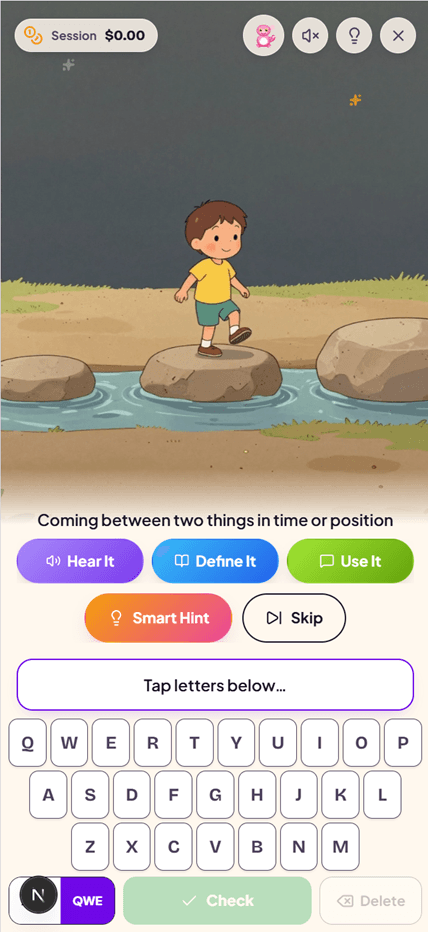
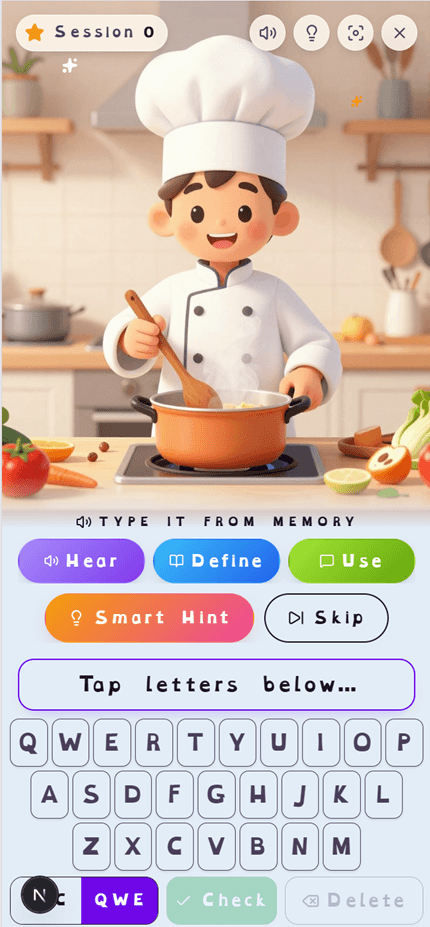
Four free toggles, per child
These settings live in every child's profile and work on every plan — free or Premium. Turn on any combination, or all four.
OpenDyslexic Font
A free per-child toggle switches the practice word, answer box, mistake reveal, and on-screen keyboard to OpenDyslexic — a font designed with weighted letter bottoms to reduce letter-flipping and swapping.
Tinted Reading Overlays
Choose none, cream, pale blue, or pale green as the practice background — the same family of overlays used for Irlen-style visual stress, with contrast checked against every color used on screen.
Extra Letter Spacing & Large Text
Two simple toggles widen letter and word spacing and bump up text size, reducing visual crowding without changing the words or difficulty.
Calm Mode
Turns off confetti bursts, pulsing mistake animations, and idle motion during practice — the mistake letters still turn red, they just don't pulse. Also respects your device's Reduce Motion setting automatically.
Everything else SpellCrush does
The reading-comfort settings sit on top of a spelling app built to be adaptive, low-pressure, and specific about mistakes.
Letter-Level Mistake Highlighting
Every child gets this, not just Learning Support families. Instead of a blanket "wrong," SpellCrush shows exactly which letters tripped them up — using the same longest-common-subsequence alignment code-diffing tools use, so a single missing letter doesn't cascade into flagging the whole word.
Focus Mode & Difficulty Check-ins
Part of Learning Support (Premium): the screen fades to just the word and answer box while your child types, and a quick "Hard / OK / Easy" check-in appears every 6 correct words.
AI Hints & Image Aids
Premium families get personalized mnemonic hints and AI-generated images tied to each word — a second, visual memory anchor for kids who don't retain spelling from text alone.
Multisensory Practice Loop
Every word is spoken aloud before your child types it, and the correct spelling is shown afterward — hear it, type it, see it, in every single round.
No Time Pressure
Core practice has no countdown clock. Kids get up to 3 attempts per word before it's revealed, at their own pace.
Printable Practice Packs
Generate offline worksheet packs from any word list — useful for kids who benefit from a paper-and-pencil break from the screen.
A way in that doesn't start with typing
Spot the Spelling is a practice mode where your child hears a word and taps the right spelling from three or four. There is no timer, nothing to type in order to answer, and the feedback after every answer can't be skipped: the right spelling turns green and is read aloud again. If your child picks a wrong one, a short look, cover, write step follows, so typing comes back in gently. In the app it follows the child's reading-comfort settings.
Choosing a spelling is easier than spelling from memory, so we treat it as a step towards typing practice, not a replacement: it earns a little XP and counts as practice for the day, but never counts towards mastery. Read the research behind it, or try the free spelling quiz.
How we talk to your child
This page uses the word "dyslexia" because that's how parents search for these tools. Inside the app, your child never sees that word — every accessibility feature and the broader Learning Support toggle are presented simply as settings, never as a label attached to them.
A child using the OpenDyslexic font, a blue overlay, and Calm Mode sees a spelling app that looks and feels comfortable to them — not a page that tells them why.
Frequently Asked Questions
Does SpellCrush use the OpenDyslexic font?
Yes. Any child's profile can turn on the OpenDyslexic font, which applies to the practice word, the answer box, mistake-highlight reveals, and the on-screen keyboard — the places where letterform confusion matters most. It's free on every plan, not gated behind a subscription.
What are the colored overlays and do they actually help?
SpellCrush offers cream, pale blue, and pale green background tints for the practice screen — the same family of colored overlays some children with Irlen Syndrome or visual stress use to reduce text glare and crowding. Response to overlays varies by child; we offer the toggle so families can try what works, not as a guaranteed fix.
Will my child be labeled 'dyslexic' anywhere in the app?
No. Inside the app, every accessibility and Learning Support feature is presented as 'Learning Support' or 'Reading comfort' — never as a diagnosis or label attached to your child. This page uses the word 'dyslexia' because that's how parents search for these tools; the product itself only ever describes settings, not children.
Is this a replacement for a dyslexia diagnosis or tutoring?
No. SpellCrush is spelling practice software, not an assessment or intervention program. It doesn't diagnose dyslexia and isn't a substitute for a structured literacy program (e.g., Orton-Gillingham) or a reading specialist. It's a tool many families use alongside those — for daily spelling practice that's easier on the eyes and gives specific, letter-level feedback.
What is letter-level mistake highlighting?
When your child gets a word wrong, SpellCrush doesn't just say "incorrect" — it shows exactly which letters tripped them up, using the same alignment algorithm (longest common subsequence) that code-diffing tools use. So if they typed "teritory" for "territory," only the missing R is flagged — not the whole back half of the word — which keeps the feedback specific instead of overwhelming.
What's included in the free trial?
Every feature for 7 days, including AI hints, custom word lists, and Learning Support's Focus Mode and check-ins. A card is required to start the trial and you won't be charged until it ends; cancel anytime before then. The font, overlay, and calm-mode accessibility toggles are free permanently, even without a trial.
Try the reading-comfort settings free
OpenDyslexic font, tinted overlays, extra spacing, and Calm Mode are free on every plan. Everything else — AI hints, custom word lists, Focus Mode — is included in the 7-day free trial.
$4.99/mo or $49.99/yr after trial · Cancel anytime · COPPA compliant