Learning Support

Fewer distractions. More of what's hard.

Learning Support is a single toggle that fades distractions while your child types, brings tricky words back more often, and adds brief check-ins so practice stays focused. Built for kids who spell better with more structure.

A per-child setting • Doesn't affect XP, streaks, or rewards

The same practice — with less to distract

Here's a practice screen with Learning Support off and on. When your child starts typing, Focus Mode fades the header and buttons so only the word and the input box remain.
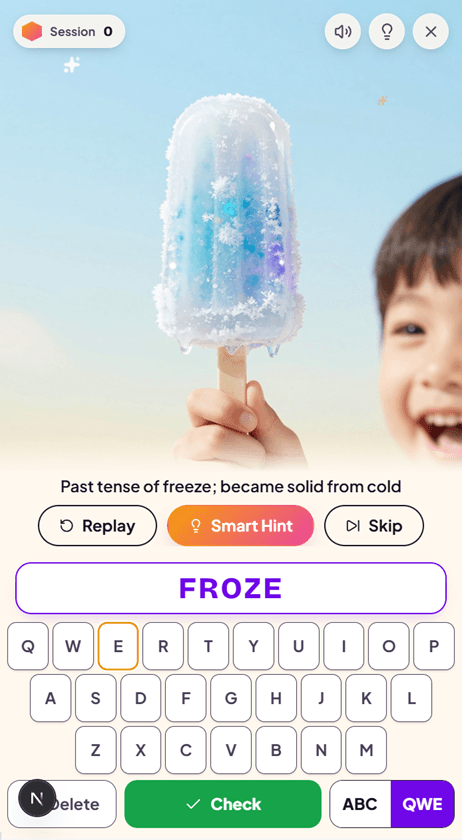
Standard SpellCrush practice screen: the session header, word image, definition, and Replay, Smart Hint, and Skip buttons are all visible while the child types FROZE.
Learning Support off

Standard practice

Every control stays on screen the whole time — great for confident spellers, but a lot to look at for a child who distracts easily.
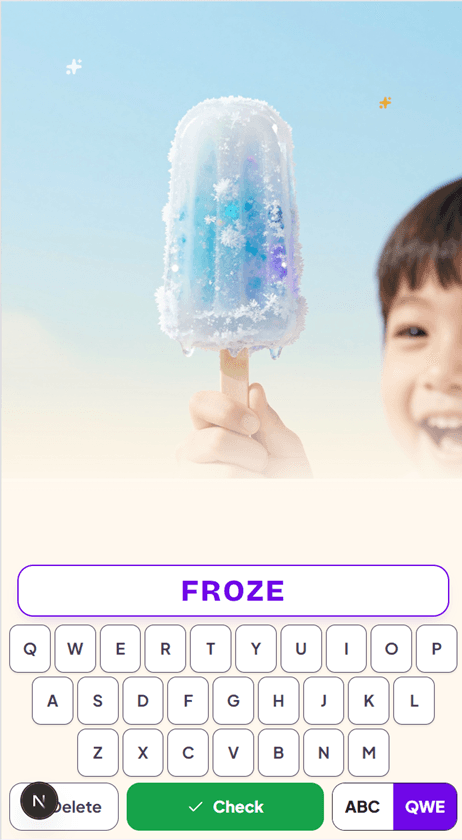
The same SpellCrush practice screen with Learning Support on: as the child types FROZE, the header, definition, and action buttons have faded away, leaving just the word image and the input field.
Learning Support on

Focus Mode while typing

The moment your child starts typing, the header and buttons fade back. The word and input box are all that's left at the point of peak effort — and everything returns the instant they stop.

One toggle, three supports

Learning Support bundles three evidence-aligned tools that work best together for kids who need a little more structure.

Focus Mode

The header and action buttons fade out while your child types, so distractions disappear at exactly the moment attention matters most — then reappear the instant typing stops.

Spaced repetition

Words your child finds tricky come back more often, at spaced-out intervals, until they're genuinely mastered — instead of being seen once and forgotten.

Difficulty check-ins

Every few correct words, a quick card asks whether that felt Hard, OK, or Easy. It builds self-awareness and tunes which words come back next.

After a few words…

How did that feel?

HardOKEasy

Who Learning Support helps most

Kids with ADHD or attention challenges who lose focus to on-screen clutter
Children who rush through words without noticing what's actually hard
Spellers who do better with a calm, distraction-free screen while typing
Kids who forget tricky words by next week and need more frequent review
Learners building the habit of self-monitoring their own difficulty
Any child who finds a busy interface overwhelming during practice

Designed with ADHD in mind. Working memory and self-monitoring are exactly the systems that make spelling hard for many kids with ADHD — and they're precisely what Focus Mode and the check-ins are built to support. Read the full ADHD spelling guide.

How to turn Learning Support on

  1. 1

    Open your parent dashboard and choose the child you want to set it for.

  2. 2

    Edit that child's profile and scroll to the Learning Support toggle.

  3. 3

    Switch it on — it takes effect at their next practice session.

It's a per-child setting, so you can turn it on for one child and leave it off for another. XP, streaks, levels, and rewards are never affected.

Learning Support FAQ

What is Learning Support in SpellCrush?
Learning Support is a single per-child toggle in your dashboard that enables extra structure during practice for kids who benefit from it. It turns on three things at once: Focus Mode, which fades the screen's buttons and chrome while your child is typing so only the word and input box remain; spaced repetition, which brings tricky words back more often until they stick; and brief difficulty check-ins, which ask your child how hard a word felt every few words to build self-awareness and tune future practice.
How is Learning Support different from Learn Mode?
They solve different problems and can be used together. Learn Mode changes how a brand-new word is introduced — the word is shown so your child can build it, then it disappears and they spell it from memory. Learning Support changes the environment around every word — fewer on-screen distractions while typing, more frequent review of hard words, and structured check-ins. Learn Mode is about teaching new words; Learning Support is about reducing distraction and reinforcing what's hard.
Who is Learning Support for?
Any child who spells better with less on-screen clutter and more structure. It was designed with ADHD and attention challenges in mind — working memory and self-monitoring are exactly what Focus Mode and the check-ins support — but it helps any child who gets distracted by the interface, rushes through words, or struggles to notice when something is genuinely hard for them.
What does Focus Mode actually hide?
The session header and the action buttons (like Replay, Skip, hint, and image) fade out the moment your child starts typing, leaving just the word prompt and the input field at the point of peak effort. Everything reappears instantly when typing stops or feedback is shown, so nothing is ever truly gone — it's simply out of the way while it would only compete for attention.
How do the difficulty check-ins work?
Every few correct words, a small card asks your child whether that stretch felt Hard, OK, or Easy. One tap and practice continues immediately. The answers help your child build the habit of noticing how difficult something felt — a skill many kids with attention challenges find hard — and they feed into how often words come back in future sessions.
How do I turn Learning Support on?
Open your dashboard, edit the child's profile, scroll to the Learning Support toggle, and switch it on. It takes effect at the next practice session. XP, streaks, levels, and rewards are completely unaffected — Learning Support only changes how practice feels, never how progress is scored.

Give your child a calmer place to practice

Create a free account, then flip on Learning Support for any child from your dashboard. Fewer distractions, more review of what's hard — without changing a thing about their XP, streaks, or rewards.